Dental practice software for Canadian clinics
The dental practice management software you talk to.
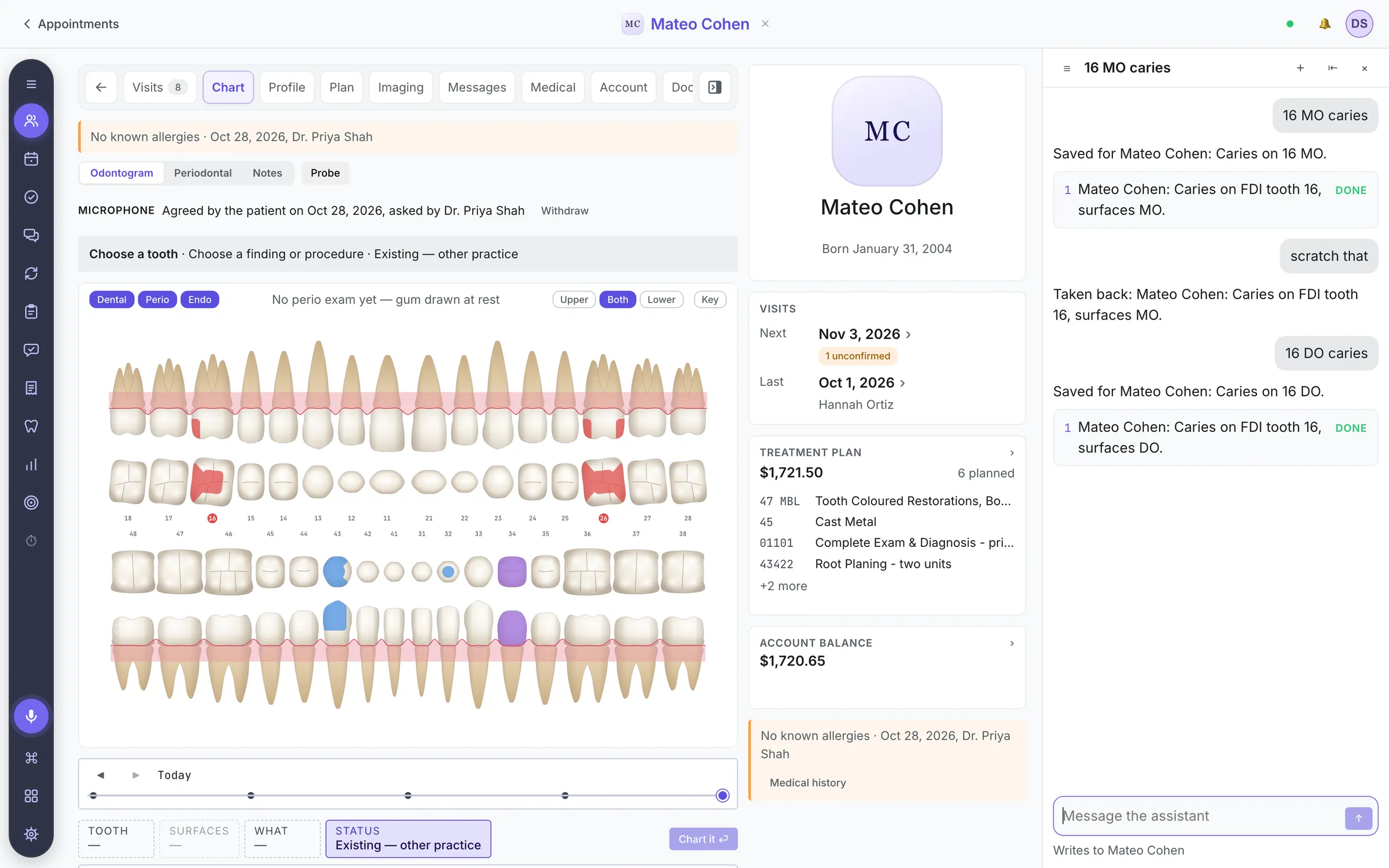
Say a chart entry and it lands on the right tooth, read back by name. Ask for a booking or a payment and Girsu shows you what it will change, then waits for your yes. The chart, the book and the money, in one system.
Chart entries save as you say them · “Scratch that” takes the last one back · Bookings and payments wait for your yes
Tell it what you want. Not which screen it lives on.
Voice here does the work rather than filling a text box: a chart entry, a lookup, a booking. What it understood is read back, so a mishearing is caught while the patient is still in the chair.
- 01
Say it, or type it
Press the microphone, or open the assistant and type. Speech becomes text on the workstation itself, and the same sentence does the same thing either way.
- 02
It knows the context
It knows who you are, which patient is open, and what your role may see. “When was her last cleaning?” needs no name.
- 03
Two kinds of action
A chart entry saves at once and is read back by patient and tooth. Anything that books, bills, texts or deletes is shown in full and waits for your yes.
Things people actually say to it
- Charting
26 MOD caries
Charts a mesial-occlusal-distal caries finding on tooth 26 for the patient on screen.
- Documentation
Make a note that she's on warfarin
Writes the note on the patient's chart for you to sign, or opens an empty one to dictate into.
- Scheduling
Find me an hour tomorrow afternoon
Computes the real gaps in that room's day, accounting for who is actually working.
- Recall
Who hasn't rebooked hygiene in six months?
Reads the recall list and the book, and hands back the patients to call.
- Messages
Text her that we're running fifteen minutes late
Reads the message back and sends it after you say yes. It lands on her communication log.
- Management
Why is our collections percentage lower this month?
Reads the ledger and answers in plain language, with the numbers behind it.
See what it will change, and what it changed.
A chart entry saves as you say it, read back by patient, tooth and surfaces. Anything that books, bills, texts or deletes is laid out in full and waits for your yes. Signed notes never change: a correction is an addendum under the original.
- Several changes from one sentence are listed together
- Each step says done, waiting for your yes, or failed
- If a step fails, the steps after it do not run
- “Scratch that” takes back the last chart entry
- Every change is in the audit trail, marked spoken or typed

A full dental PMS underneath the voice, and the apps run on it.
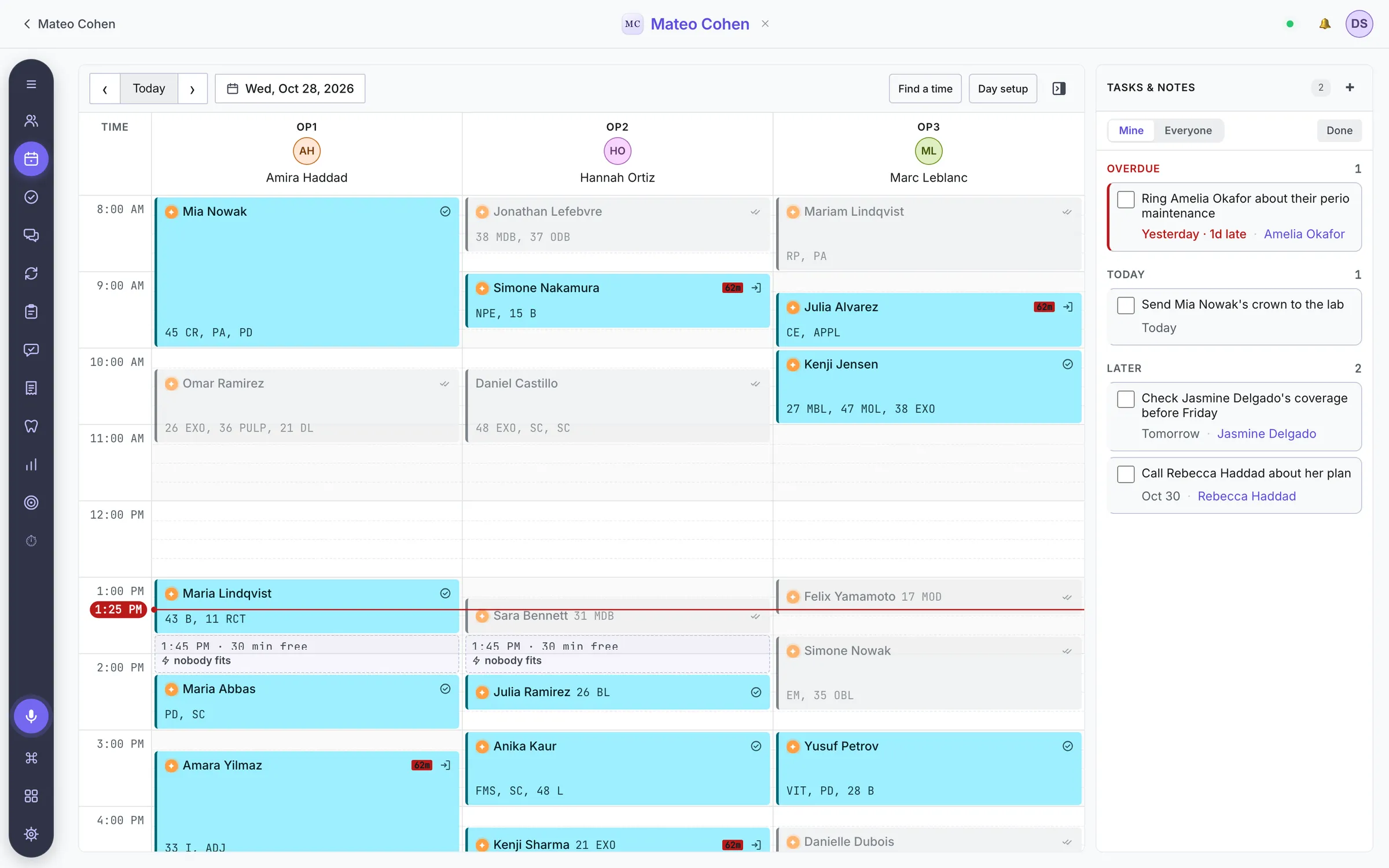
Voice is only useful if there is something real behind it. Girsu runs the whole practice — the front desk, the operatory, the imaging, and the money — and every app you add works on the same records.
-
Clinical charting
Odontogram, perio, findings, diagnoses, and treatment plans. Chart by voice or by clicking — the same records either way.
-
Scheduling that reads the room
Multi-operatory, multi-provider scheduling that knows who is actually working, and can find and fill gaps on request.
-
Notes you can dictate
Templates per procedure, dictation straight into the note, and a signature that seals it. A correction is an addendum, never an edit.
-
Imaging built in
A viewer with mounts, measurements and annotations, on the chart rather than in a separate app. Your sensor's own capture program opens from the patient's record.
-
Insurance and claims
Coverage, estimates with frequency limits, predeterminations and claims. Electronic claims through CDAnet are in certification.
-
Ledger and billing
Charges post from completed procedures, statements go out, and Explain says why a balance is what it is, line by line, with the insurer's expected share.
-
Online booking
Patients pick a visit, a provider and a free time from your real schedule, from a link in a text or on your website. The desk accepts, or it books itself.
-
Your server, or ours
On a server in the clinic, the chart, the book and the ledger keep working through an internet outage; texts, e-claims and the assistant wait for it. Or let us host it.
-
Apps that run inside it
Online booking, review requests, text campaigns, staff calendar, time clock and staff chat, on the same records and the same audit trail.
Rehearse the move before you make it.
For an Open Dental practice, the move is an import you can repeat and check, not a weekend you hope goes well.
Coming from another system? We look at what it can export first, and tell you what would come across before we quote.
Leaving is plain too. Any patient's record exports as one ZIP of PDFs, spreadsheets and original images that opens without Girsu.
- 01
A copy, not your live system
We load a backup of your Open Dental database. The import only reads it, and can be run again as often as the rehearsal needs.
- 02
Everything that moves, accounted for
Patients and families, the book and its history, charts and perio, notes, insurance plans and claims, the ledger, forms, recalls, labs, and documents from your image folder. A report names every row it could not place, and why.
- 03
Money checked against the old system
Completed fees, payments, insurance payments and adjustments are compared with Open Dental's own figures, and every household's balance with its balance there.
- 04
Your team looks before it counts
Your team opens their own patients, book and balances in the rehearsal before anything changes in the real clinic.
- 05
A final run, then go live
The evening before go-live, a last run from that day's backup brings everything across, and you sign off its report. From your team's first entry in Girsu the import never runs again, so nothing they enter is overwritten.
Questions to ask any dental software vendor.
Ask us, and ask whoever else you are looking at. These are our answers.
- What does a spoken command actually change?
- Chart findings and procedures, notes, bookings, texts and lookups, on the record that is open. A few things stay on screen, like picking a file or typing an address.
- What saves at once, and what waits for me?
- Chart entries save at once and are read back. Anything that books, posts money, texts a patient or deletes is shown in full and waits for a yes.
- What happens when it mishears?
- It names the patient, tooth and surfaces it heard. “Scratch that” takes back the last entry. A signed note is never edited; a correction is an addendum.
- What still works when the internet is down?
- With the server in your clinic: the chart, the book, imaging and the ledger, over your own network. Texts, electronic claims and the assistant wait. Hosted, you need the connection.
- Where do our words and records go?
- Speech becomes text on the workstation, and chart commands are understood there too. Requests it cannot read locally go as text, with the records needed to answer, to a hosted AI model. The natural speaking voice and live conversation use a hosted voice service.
- How does our data come across, and how do we check it?
- From Open Dental: a rehearsal on a copy, a report of every row not placed, and money compared household by household. From anything else: we assess the export before we quote.
- Can we get our records out?
- Any patient's record exports as one ZIP of PDFs, spreadsheets, original images and a manifest. Claims, lab cases and recall dates are not in it yet.
- Are electronic claims certified?
- Not yet. Our CDAnet certification is in progress.
Girsu at a glance
- What it is
- Dental practice management software (dental PMS) for Canadian clinics
- How you use it
- Speaking, typing or clicking, on the same records
- AI and control
- Chart entries save as said and are read back; bookings, money, texts and deletions wait for a yes
- Deployment
- Desktop app against a server in the clinic, or hosted by us
- Internet outage
- With a server in the clinic, the chart, book and ledger keep working
- Migration
- Rehearsed import from Open Dental, with a reconciliation report
- Platforms
- macOS today, Windows in development; patients use any phone's browser
- Claims
- CDAnet certification in progress
- Pricing
- Quoted per practice. The demo is free
Straight answers
What is Girsu?
Girsu is dental practice management software for Canadian clinics, built to be operated by voice. It is designed as the operating system for the dental practice: scheduling, clinical charting, imaging, notes, treatment planning, insurance and billing in one system, with apps that run on the same records. Much of that work can be done by saying or typing a sentence; the rest is ordinary clicking, on the same records.
What does AI-native dental practice management software mean?
It means the assistant can do the work, not only answer questions about it. The application's own actions are its tools, so it can read the schedule, the chart and the ledger and act in them. It opens from any screen, by the microphone or as a side panel, and already knows which patient is open. What it does is shown step by step, and anything that books, bills, texts or deletes waits for a yes.
Can a dental practice management system really be run by voice?
Much of it, yes. Voice in Girsu carries out actions rather than only transcribing text. Saying "26 MOD caries" charts the finding on the right tooth for the patient already on screen and reads it back; "scratch that" takes it back. Saying "open John Smith" opens the chart. The microphone is on every screen, so a clinician can work with gloved hands. A few tasks, like picking a file, stay on screen.
Does Girsu work without an internet connection?
That depends on where the clinic puts the server. Girsu is a desktop application that talks to one server. On the clinic's own hardware, an internet outage does not stop the schedule, charting, notes, imaging or the ledger: the workstations reach the server over the clinic's network, and only the parts that need the outside world — texting patients, electronic claims, the AI assistant — wait for it to come back. Hosted, the clinic depends on its connection. There is no offline mode on a workstation itself.
How is Girsu different from Dentrix, Eaglesoft, or Open Dental?
Girsu was designed around saying what you want, so a chart entry, a lookup or a booking starts from a sentence rather than from finding the right screen, and every step it takes is shown. It runs on a server in the clinic or hosted, keeps a hash-chained audit trail of every write, adds features as apps on the same records, and imports an Open Dental practice with a reconciliation report. Ask any vendor, us included, to show you these on a working system.
Does the AI make clinical decisions on its own?
No. A chart entry said aloud is applied at once, read back, and taken back with a word; anything that posts money, books a visit, deletes a record or completes work asks first. Signed clinical records never change: a correction is an addendum under the original, and signing is limited to clinical roles. The AI drafts, retrieves, calculates, and prepares; a clinician decides.
Can we migrate our existing patient data?
Yes. An Open Dental practice is imported from a copy of its own database by a repeatable import that moves patients, appointments, charts, notes, insurance, the ledger and documents, and writes a reconciliation report naming every row it could not place and why. We run it on a copy first, so the clinic sees its own data in Girsu before committing, and once more the evening before go-live. Other systems are assessed first: we look at what they can export before we quote.
Where does patient data live, and is it secure?
Records live in the clinic's own Postgres database, on a server the clinic chooses: on-site or hosted. Connections are over TLS. Documents and radiographs are encrypted at rest when the server is given a key. Access is by role, and every write lands in a hash-chained audit trail an administrator can verify from Settings, the assistant's marked as spoken or typed. Speech becomes text on the workstation; requests the workstation cannot read itself go as text, with the records needed to answer, to a hosted AI model.
What platforms does Girsu run on?
The clinical application is a desktop app. It runs on macOS today; the Windows version is in development. Patients reach online booking, intake forms and consent signing from any phone's browser. There is no staff mobile app or web client.
What does Girsu cost?
Pricing is quoted per practice, because it depends on the number of operatories, whether we host the server, and which apps a clinic turns on. The demo is a free 30-minute walkthrough on a sample clinic, with no obligation. For an Open Dental practice, the next step is a rehearsal import on a copy of its data.
See a clinic day in Girsu.
A walkthrough on a sample clinic, with your questions driving it. Your own data comes later, and only if Girsu looks right for you.
- 30 minutes, on a working system. Charting by voice, the book, and the money, on sample patients.
- Then, if it fits, a rehearsal. For an Open Dental practice, an import on a copy of your data, with a report of anything that did not come across.
- No obligation and no pressure. If it is not right for your practice, we will say so.
Prefer email? hello@rt-tech.ca